![izon-hero-logo-colour-white.png]](https://support.izon.com/hs-fs/hubfs/branding/logos/izon-hero-logo-colour-white.png?height=40&name=izon-hero-logo-colour-white.png)
Please note your Pulsoid must already be running firmware v1.5 or later to use this process.
Before proceeding with the firmware update:
-
Ensure you're running the latest version of the Pulsoid Control Suite (check the latest version here matches your Pulsoid Control Suite).
-
Ensure your Pulsoid is running firmware v1.5 or later; see the version number next to the 'Update Firmware' button (Figure 1) which is displayed when the Pulsoid is connected. If the firmware version is showing v1.4 or earlier, contact Izon Support.
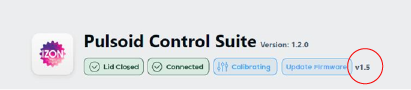
Figure 1: Firmware version currently installed on the connected Pulsoid .
-
Click on the 'Update Firmware' button and follow the on-screen instructions.